pgvector extension gives you vector storage, an HNSW index, and similarity queries in the database you already run. A dedicated vector DB earns its keep at very large scale, or when search is your whole product.The Search Problem Keyword Matching Can’t Fix
Someone types “staff for a temporary school” into your search box. The record they want is filed under “supply teacher recruitment services.” Zero shared keywords.
Your ILIKE '%...%' query returns nothing, and the user concludes your product is broken.
That’s the wall every keyword search hits eventually. It matches strings, not meaning.
Semantic search fixes this by working in a different space. Instead of comparing words, you compare vectors: a numeric fingerprint of meaning that an embedding model produces. Two phrases that mean the same thing land near each other, even with no words in common.
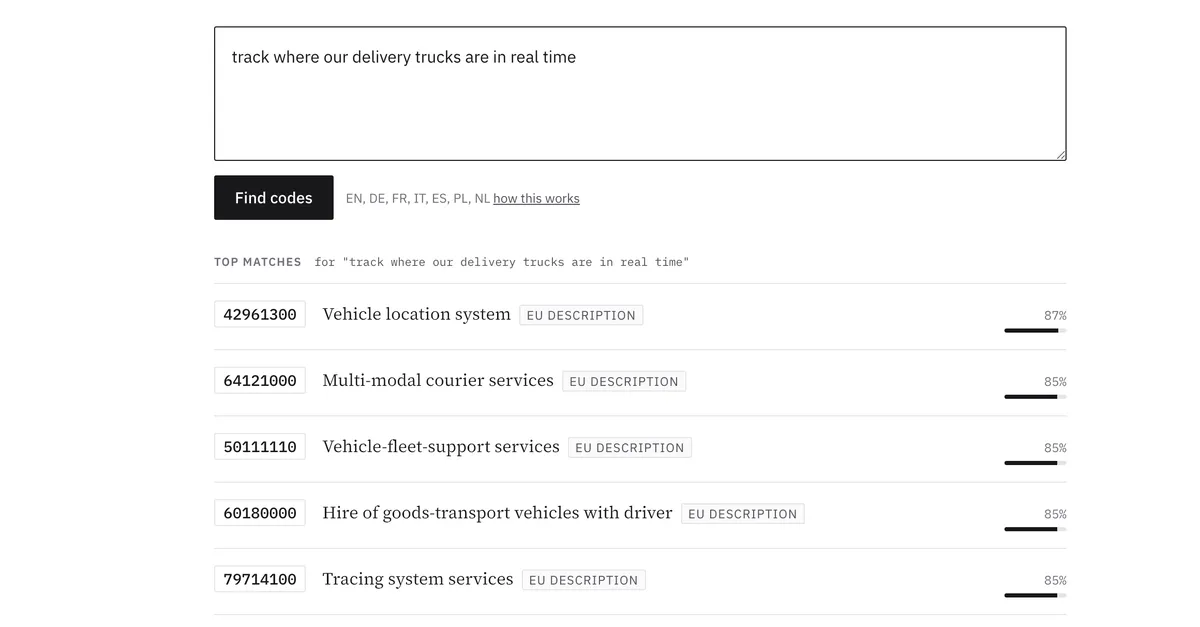
You don’t need a specialized vector database to do this. If your data already lives in Postgres, you need an extension and a query. We built exactly this for TenderCodes, our directory of EU public-procurement codes, and this post is how the technique actually works, with the hard parts left in.
How Semantic Search Works, in Three Moves
Strip away the jargon and the whole thing is three steps.
Embed your content once. Run every record through an embedding model. It returns a fixed-length array of floats (a vector), which you store next to the record and refresh in a backfill job whenever the record changes.
Embed the query at search time. When someone searches, run their query string through the same model. Now you have a query vector in the same space as your content vectors.
Find the nearest neighbors. Ask the database: which stored vectors sit closest to this query vector? The closest ones are your most semantically relevant results.
The “closest” part is a distance calculation. Cosine distance is the usual pick for text: it measures the angle between two vectors and ignores their magnitude, which is what you want when you care about meaning rather than length.
That’s the entire shape. The interesting decisions are in how you store the vectors, how you index them, and where the embedding model runs. Let’s take those in order.
Why pgvector and Not a Dedicated Vector Database
The reflex is to reach for Pinecone, Weaviate, or Qdrant. They’re good tools. For most applications, they’re also a second database you didn’t need.
Here’s the reasoning we keep coming back to, the same one behind our piece on running Postgres until it isn’t enough. A dedicated vector store means a second system to deploy, secure, back up, monitor, and keep in sync with your real data. Every search that needs to filter by tenant, permission, locale, or recency now spans two databases, so you end up denormalizing into the vector store or stitching results together in application code.
pgvector collapses all of that. It’s a Postgres extension that adds a vector column type, distance operators, and approximate-nearest-neighbor indexes, so your vectors live in the same table as everything else. A semantic search that also filters by locale and only returns published rows is one SQL query, with a real JOIN, inside one transaction.
In TenderCodes the entire vector store is a column. Our schema turns the extension on with one line:
enable_extension "vector"And the embedding is just another column on the table that already holds the content:
t.vector "embedding", limit: 1024No second database, no sync job. Filtering by locale and similarity threshold in one query is just Postgres doing what it’s good at, joining and filtering, with vectors as another data type.
When would we reach for a dedicated vector DB? When the corpus runs into the hundreds of millions of vectors, or when search latency at extreme scale is the product itself. That’s a real ceiling, and most products never come close to it. Ours doesn’t.
Storing and Indexing Vectors
A vector column stores the embedding. The number in limit: 1024 is the dimension count: how many floats each vector holds. You don’t pick it freely: it’s fixed by whichever embedding model you use, so choose the model and the dimension follows.
Without an index, every search is a sequential scan: Postgres compares your query against every stored vector. Fine for a few thousand rows. Painful past that.
pgvector offers two index types. IVFFlat partitions vectors into lists and searches the nearest few. HNSW (Hierarchical Navigable Small World) builds a layered graph you can traverse quickly.
HNSW costs more to build and uses more memory, but it gives better recall at a given speed, so it’s the one we use.
Here’s the index from our schema:
t.index ["embedding"],
  name: "index_..._on_embedding_hnsw",
  opclass: :vector_cosine_ops,
  using: :hnsw
Two details matter. using: :hnsw picks the graph index. opclass: :vector_cosine_ops tells the index to optimize for cosine distance, which has to match the distance operator your queries use.
Mismatch them and the index silently won’t get used. Your queries still return correct results, just slowly, and you won’t notice until production traffic does.
A word on the honest tradeoff. HNSW is approximate: it can miss a true nearest neighbor occasionally in exchange for being fast. pgvector exposes tuning knobs for the build (graph connectivity) and the query (how hard to search) that trade recall against cost.
We run the defaults. For a directory where “five good matches” beats “the single mathematically closest match retrieved a hair slower,” approximate is exactly right.
If you were doing something where a missed neighbor is a correctness bug, you’d tune those knobs or accept the cost of an exact scan. Know which world you’re in.
The Embedding Model: Why We Run It Ourselves
This is the decision people underestimate, so it gets the most space.
You have two ways to turn text into vectors: call a hosted embeddings API (OpenAI and others sell this), or run an open model on your own hardware. The API is genuinely easier: one HTTP call, no model to load, no GPU to think about. For plenty of projects it’s the right answer, and we’d tell you so.
We don’t use it for TenderCodes. The reason is one sentence we put in front of users, in every language we support: “Semantic search uses sentence embeddings (multilingual-e5-large) computed locally. Your query never leaves our servers.”
You can’t make that promise and call a third-party API. The moment a query leaves for someone else’s servers to be embedded, it has left your servers, so we run the model ourselves. This is the same data-residency logic we wrote about in keeping AI on-premise for privacy-first Europe: for European users handling sensitive intent, “where does this data go” is a feature, not a footnote.
Why multilingual-e5
The model is intfloat/multilingual-e5-large-instruct (the user-facing copy above shortens it to the multilingual-e5-large family name). It’s open, it’s multilingual, and that second word is the whole point.
EU procurement happens in every member-state language. A multilingual model maps all of them into one shared vector space, so the same embeddings serve a German speaker searching in German and an Italian searching in Italian, with no separate pipeline per language.
The model can even match across languages, but we deliberately scope each query to its own locale (WHERE locale = $1), so a German search ranks German records by meaning rather than keyword. One model, every language, each in its own lane.
Getting that breadth from the model is free. Bolting multilingual support onto an English-only embedding model would be a project of its own.
The e5 family has one quirk worth knowing: it expects an instruction prefix on queries but not on stored passages. Our sidecar handles that. Queries get a prefix telling the model what kind of retrieval this is; passages get embedded plain.
Get this wrong and your recall quietly degrades, because queries and passages end up in subtly different corners of the space. It’s the kind of detail that doesn’t throw an error. It just makes results worse.
What self-hosting actually costs you
Here’s the part the “just run an open model” advice skips. Self-hosting embeddings is more operational work than an API call, not less. We do it anyway. But let’s be honest about the bill.
The model runs as a small service alongside the app, a FastAPI server that loads the model once at boot and answers embedding requests over HTTP. Deploying it means baking the model weights into a container image at build time so the running container doesn’t phone home to download them. That image is multi-gigabyte and architecture-specific (ours targets arm64).
It runs on CPU, not GPU. We quantize the model to int8 and serve it through ONNX, which makes CPU inference fast enough without paying for accelerator hardware. That’s a deliberate trade: a touch of accuracy for a much cheaper, simpler host.
Then there’s the operational tail nobody mentions in the tutorial:
- The server processes one embedding at a time, on purpose, with a hard concurrency limit. A query embedding takes real CPU. Let several run at once on a small box and they fight, so we serialize them and keep the box predictable.
- It needs a real health check. Ours exposes a
/readyzendpoint that returns ready only once the model has finished loading, and a watchdog that fails the check if an embedding call ever wedges. The deploy waits a generous startup window before trusting it, because loading a model is not instant. - We push the image to more than one registry, because the host pulls from either one depending on how it was deployed. Forget one and a deploy fails at the worst time.
None of that exists when you call an API. You trade a single function call for a service with a lifecycle. We make that trade because the privacy promise is worth more to our users than the convenience is worth to us.
If you don’t have that constraint, an embeddings API is a perfectly good answer, and we’d point you to one.
Tying It Together: The Search Query
With vectors stored and the model serving, the actual search is almost anticlimactic. Embed the query, find the nearest neighbors, keep the ones above a relevance threshold.
The core of it, simplified, looks like this:
SELECT cpv_code, official_title,
       1 - (embedding <=> $query_vec) AS score
FROM cpv_official_translations
WHERE locale = $locale
ORDER BY embedding <=> $query_vec
LIMIT 50;
The <=> operator is pgvector’s cosine distance. Smaller distance means more similar, so ordering by it puts the best matches first and lets the HNSW index do its job. We flip distance into a friendlier 0-to-1 score with 1 - distance, then drop anything below a confidence threshold so weak matches don’t pollute the results.
A bad semantic match is worse than no match: it looks confident and wrong.
Our production query does more than this, joining enriched content and falling back across a couple of sources, but the engine is exactly what’s above: order by vector distance, filter by threshold.
Two production touches are worth stealing. We cache query embeddings, because users retype the same searches and there’s no reason to pay for the same vector twice. And when the embedding service is unreachable, search degrades to a plain keyword match instead of returning an error.
Slower, dumber, still useful. A search box that returns something beats a spinner that never resolves.
If you’re building this to sit underneath an LLM rather than a search box, the same pieces power retrieval-augmented generation: our explainer on RAG systems for company knowledge and the deeper dive on AI-enhanced internal search both build on this exact foundation.
What You Actually Need
Semantic search has a reputation for being an AI moonshot. It isn’t. It’s an extension, a column, an index, and a model you can run on a CPU.
If your data lives in Postgres, start with pgvector. Add a vector column, an HNSW index with the cosine opclass, and a query that orders by distance. Then pick an embedding model that fits your languages and your privacy constraints, and decide deliberately whether it runs on someone else’s servers or yours.
That decision, more than the SQL, is the one that defines the system.
Everything else is the same boring, reliable Postgres you already run. Which, when you’re building something people trust with their searches, is exactly what you want underneath it.
Thinking about adding semantic search to your product, or weighing self-hosted models against an API for privacy reasons? Let’s talk it through. We’ll look at your data, your scale, and your constraints, and tell you honestly what you need.